Dear students, this page will be updated during the training. Please check back regularly for updates.
Location
- 👨🏻💻 Microsoft Teams session link
- 🔬 AWS Labs link
- 🗒️ Miro Board
Feedback
We need to collect feedback from the training to Rumos and to AWS about this trainig: Please come back to this page after the training and fill out the forms.
Material
Day 1
Before first Lab.
- Be aware of pop-up windows, example in Safari you need to click tiny icon in the right of the address bar to allow pop-ups.
- Labs have
High-Level Instructions, if you feel confident just try to do with them, if you need more help, you can follow theDetailed Instructions. - Labs have
Choice AandChoice Bas potential solutions, analise bouth and pick the one you think is correct. At the end of the lab you can check theSolutionto see right solution.
Book
Get your book from Gilmor after accessing it the first time from the builder lab’s button.
SDKs
- Python:
- Boto3 documentation, at https://boto3.amazonaws.com/v1/documentation/api/latest/index.html
- Boto3 quickstart at, https://boto3.readthedocs.org/en/latest/guide/quickstart.html
- .NET:
- Install AWSSDK packages with NuGet, at https://docs.aws.amazon.com/AWSSdkDocsNET/latest/V3/DeveloperGuide/net-dg-install-assemblies.html
- Starting a new AWS SDK for .NET project, at https://docs.aws.amazon.com/AWSSdkDocsNET/latest/V3/DeveloperGuide/net-dg-start-new-project.html
- Java:
- Developer guide - AWS SDK for Java 2.x, at https://docs.aws.amazon.com/AWSSdkDocsJava/latest/DeveloperGuide/java-dg-install-sdk.html
- Other:
- AWS Amplify: Amplify Documentation, at https://docs.amplify.aws/
- AWS SDK for Ruby: https://aws.amazon.com/sdk-for-ruby/
- AWS SDK for JavaScript in Node.js: https://aws.amazon.com/sdk-for-javascript/
- AWS SDK for Go: https://docs.aws.amazon.com/sdk-for-go/v1/developer-guide/welcome.html
- AWS SDK for JavaScript: https://docs.aws.amazon.com/AWSJavaScriptSDK/latest/
- AWS SDK for PHP: https://docs.aws.amazon.com/sdk-for-php/v3/developer-guide/welcome.html
- AWS SDK for C++: https://aws.amazon.com/sdk-for-cpp/
- AWS SDK for Swift: https://aws.amazon.com/sdk-for-swift/
- AWS SDK for Rust: https://aws.amazon.com/sdk-for-rust/
- AWS SDK for Kotlin: https://aws.amazon.com/sdk-for-kotlin/
- API references:
- AWS CLI: https://docs.aws.amazon.com/pt_br/cli/latest/index.html
- AWS SDK for Python (Boto3): https://boto3.amazonaws.com/v1/documentation/api/latest/index.html#
- AWS SDK for Java: https://docs.aws.amazon.com/AWSJavaSDK/latest/javadoc/overview-summary.html
- AWS SDK for .NET: https://docs.aws.amazon.com/sdkfornet/v3/apidocs
CLI
- AWS CLI Command Reference (http://docs.aws.amazon.com/cli/latest/reference/).
- https://awsu.me - It’s an open source tool that helps you manage AWS access keys on the command line.
- My Terminal is Warp avaialble for Mac, windows soon.
IAM
- IAM Identities https://docs.aws.amazon.com/IAM/latest/UserGuide/id.html
- IAM Policies https://docs.aws.amazon.com/IAM/latest/UserGuide/access_policies.html
- Creating your first IAM admin user and user group (https://docs.aws.amazon.com/IAM/latest/UserGuide/getting-started_create-admin-group.html)
- Identity-based policies and resource-based policies (https://docs.aws.amazon.com/IAM/latest/UserGuide/access_policies_identity-vs-resource.html)
- IAM roles (https://docs.aws.amazon.com/IAM/latest/UserGuide/id_roles.html)
- AWS service role (https://docs.aws.amazon.com/IAM/latest/UserGuide/id_roles_terms-and-concepts.html#iam-term-service-role)
- Creating a role to delegate permissions to an AWS service (https://docs.aws.amazon.com/IAM/latest/UserGuide/id_roles_create_for-service.html)
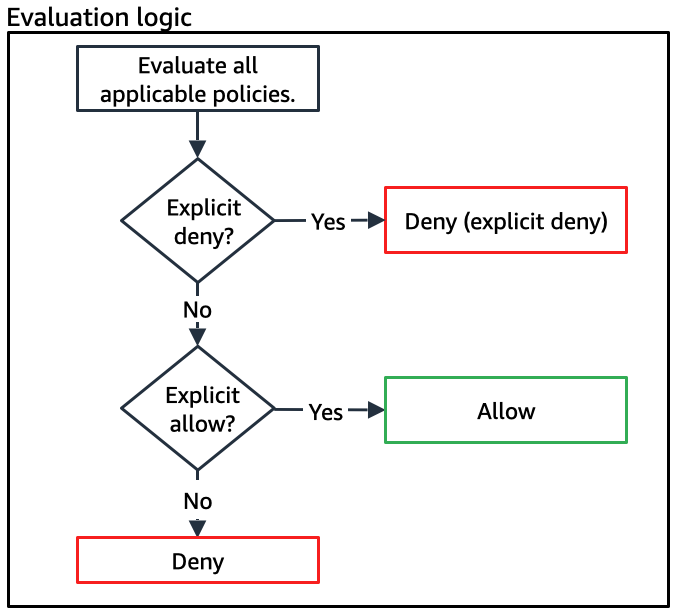
- Policy evaluation logic (https://docs.aws.amazon.com/IAM/latest/UserGuide/reference_policies_evaluation-logic.html)
S3
Lab1: Configure Enviroment - Cloud9, IAM, S3
- Enter Cloud9, Configure AWS CLI
- Check AWS Toolkit
- Try to delete S3 bucket (wrong permissions)
- Add required Policy to delete S3 bucket, Delete S3 bucket
Lab2: Develop on S3 - S3 Create, Upload File, Download File, Update Bucket Policy, Static Website Hosting
- Create S3 bucket by code (Find in source code where is the comment TODO 1, 2, 3, etc..)
- Upload file to S3 bucket by code
- Download process and upload a file to S3 bucket by code
- Update public restrictions to S3 bucket
- Copy static website files to S3 bucket
- Enable static website hosting on S3 bucket
- Update bucket policy to allow public access to static website
- Test the website http endpoint
Note:
- Step 34: it says
aws s3api put-public-access-block --bucket $mybucket --public-access-block-configuration "BlockPublicPolicy=false,RestrictPublicBuckets=false"It should sayaws s3api put-public-access-block --bucket %myBucket% --public-access-block-configuration "BlockPublicPolicy=false,RestrictPublicBuckets=false"
Day 2
Lab3: Develop on DynamoDB - Create Table, Insert Data, Query Data, Update Data
- Create DynamoDB table by code
- Insert data to DynamoDB table by code from json file
- Query data from DynamoDB table by code
- Scan data from DynamoDB table by code with pagination
- Update data from DynamoDB table by code
- Experimente with PartyQL to query data from DynamoDB table
Day 3
🙋♀️ Parking Lot 🙋♂️ - Answers to your open questions
Q: why is python sdk called boto3
A: Boto3 is maintained and published by Amazon Web Services. Boto (pronounced boh-toh) was named after the fresh water dolphin native to the Amazon river. The name was chosen by the author of the original Boto library, Mitch Garnaat, as a reference to the company. Source
Q: S3 - ACL and policy are they overwriting each other ? What’s the priority ?
A: Source
Q: What’s the max concurrency request on S3 by default
A: Source
Q: Can we manually delete multi parts from s3?
A: Yes we can, it’s nos as simple as pressing a button, you need to create a policy Source or run a CLI command Source
Q: Can we define a max size upload on a pre-sign url?
Q: Difference between bulk cp and sync on S3
A: AWS s3 cp will copy all files, even if they already exist in the destination area. It also will not delete files from your destination if they are deleted from the source. AWS s3 sync looks at the destination before copying files over and only copies over files that are new and updatedSource Source Source
Q: Can a user see policies without having specific permissions to do so?
A: Policies and permissions in IAM - Testing IAM policies with the IAM policy simulator
Q:
A: Source
Content will be added here asynchronously.